ImageRestoreAI vs Media.io: Restore a Photo or Build a Video?
Updated
Compare Media.io photo restoration and its animation workflow with ImageRestoreAI, including checks that separate repaired scans from creative motion.
Upload Your Photo To Restore NOW – FREE Preview
Drag & drop or click to select • JPG, PNG, WebP, HEIC
FREE Preview • Review your result before purchasing
Media.io is worth considering if your project continues from photo repair into animation. ImageRestoreAI fits a focused still-photo restoration decision, with a free preview and paid download. Start by deciding whether you want a cleaner photograph, a creative video, or both; each output needs its own review.
Publisher disclosure: This comparison is written and published by the ImageRestoreAI team, which operates one of the services discussed. It is an editorial comparison of documented features and workflow fit, not an independent review or hands-on comparative test. Official sources were checked on September 16, 2026; recommendations are our editorial judgment.
Media.io includes photo restoration
Media.io's official photo-restorer page describes an online upload, repair, preview and download workflow. It advertises treatment of scratches, tears, fading and discoloration, and also presents an optional restore-then-animate sequence. It should not be dismissed as a video platform with no restoration capability. Media.io photo restorer, checked September 16, 2026.
That sequence may be convenient for a family slideshow or a creative motion portrait. It is not evidence that the resulting movement happened, or that the repaired still is historically exact. We have not processed a shared set of photographs through Media.io and ImageRestoreAI.
ImageRestoreAI's narrower still-photo workflow gives you a restoration candidate to inspect before purchasing its download. A selected output can then be used in a separate project if you wish. The narrower scope does not establish better quality or make it inherently a better value than tools you already use.
Review the still before adding motion
Restoration and enhancement can change the base photograph. Animation then adds another layer of interpretation, including expression or movement. If you judge only the moving result, you may overlook a changed face, an altered hand or an object removed from the original.
Save the original scan, the accepted restored still and any animation as separate files. Label the animation as AI-generated motion when sharing it. A clear separation lets relatives see what was in the source and what was added later.
A photo with detail worth checking
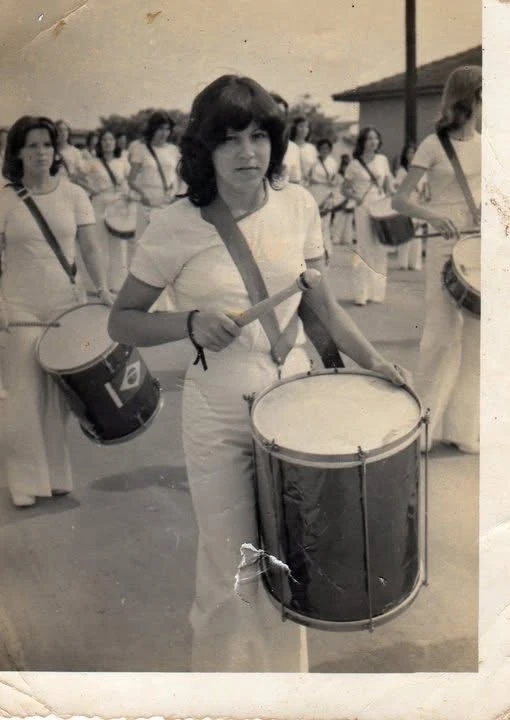
Original scan
AI restoration
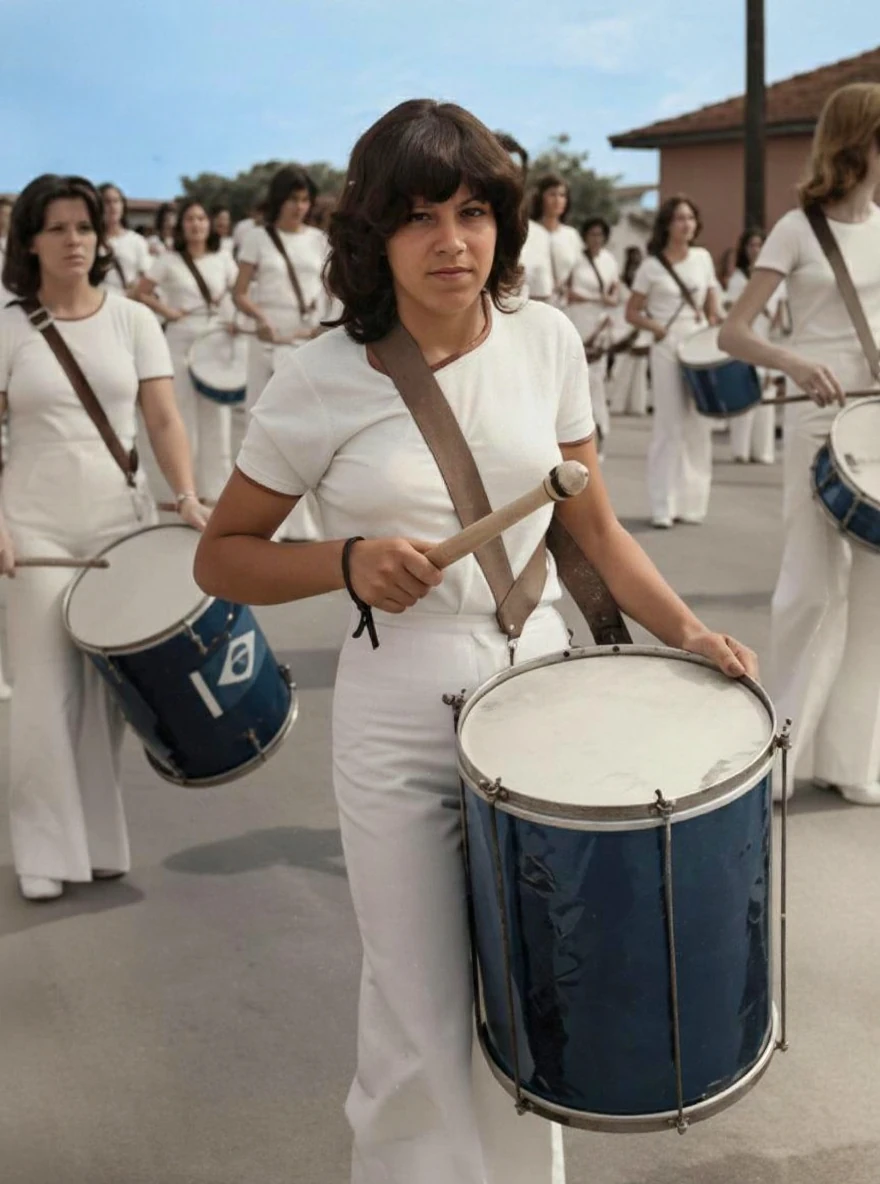
Creases and abrasion in a drummer photograph · Real customer example
The original has folded corners, marks along its pale border and a conspicuous damaged patch beside the foreground drum. These marks are no longer visible in the AI result, which adds color and makes the clothing and drums appear clearer. The original print border is not retained in the output.
What to check: Colors, facial features, drum details and small background elements are reconstructed. Border removal is a change in the product output, not proof that the paper itself was repaired.
Published with permission. Full framing retained; original and result may have different proportions. Reviewed September 10, 2026.
See the reviewed gallery and more damage types →This selected ImageRestoreAI result removes a visible damaged patch but also changes drum details, color and framing. It is not a comparative benchmark, contains no Media.io result and demonstrates no animation capability. It gives concrete examples of details to review before any later creative use.
Decide which operation your photograph needs
If the print has scratches or missing areas, inspect repair of those regions. If it is intact but soft, judge enhancement of the existing detail. If the goal is a larger print, inspect the enlargement separately. Increasing resolution does not by itself establish that damage was repaired, and a plausible reconstruction does not verify the lost content.
For black-and-white sources, decide whether to preserve monochrome before adding color. For a documentary family record, keep a version that retains handwritten notes and the complete border even if a creative version uses a tighter composition.
Questions to answer before paying
- Does the still image meet your needs without animation concealing small defects?
- Are the faces, hands, instruments and background objects acceptable when viewed beside the source?
- Does the chosen tool export the still at the dimensions you need?
- Are restoration and any later video generation covered by the offer you are considering, or handled separately?
- What are the current watermark, credit and download conditions in your account?
A page advertising free access is not enough to establish that every desired export is free. We do not quote a current Media.io allowance or assume that a restoration purchase includes another tool. ImageRestoreAI offers a free preview and paid download; check its current purchase terms too.
For a still-photo alternative with editing tools, read the Fotor comparison. The family photo guide and reviewed gallery help assess the original and output. Return to compare photo restoration, or start an ImageRestoreAI preview.
Ready to try it yourself?
Upload your photo for a free preview. Compare faces, colors and detail before purchasing.
Upload Your Photo To Restore NOW – FREE Preview
Drag & drop or click to select • JPG, PNG, WebP, HEIC
FREE Preview • Review your result before purchasing