AI Photo Restoration Service: Preview Your Own Photo
ImageRestoreAI restores digital copies of old photographs using AI. Upload a scan or a clear photograph of your print, inspect a free preview, and review the purchase options if you want access to the restored result. You keep the physical original; this service does not repair paper, emulsion or an album.
It is a useful first step for scratches, fading, creases and damaged portraits when you can judge the result yourself. Reconstructed faces, colors and missing areas can differ from the original. A photo that looks cleaner is not necessarily more historically accurate.
See the repair and the changes
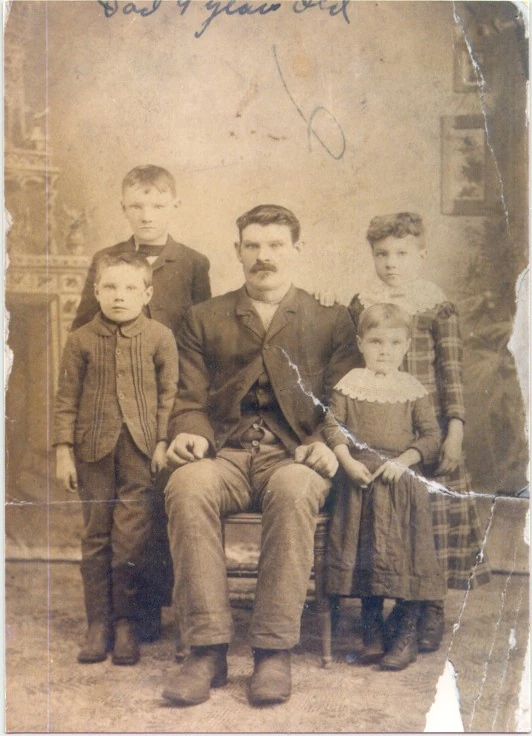
This selected customer example shows a torn group photograph. The output fills gaps and adds color, but also changes details. It illustrates our own product, not a test against another service or a promise about your result.
Original scan
AI restoration
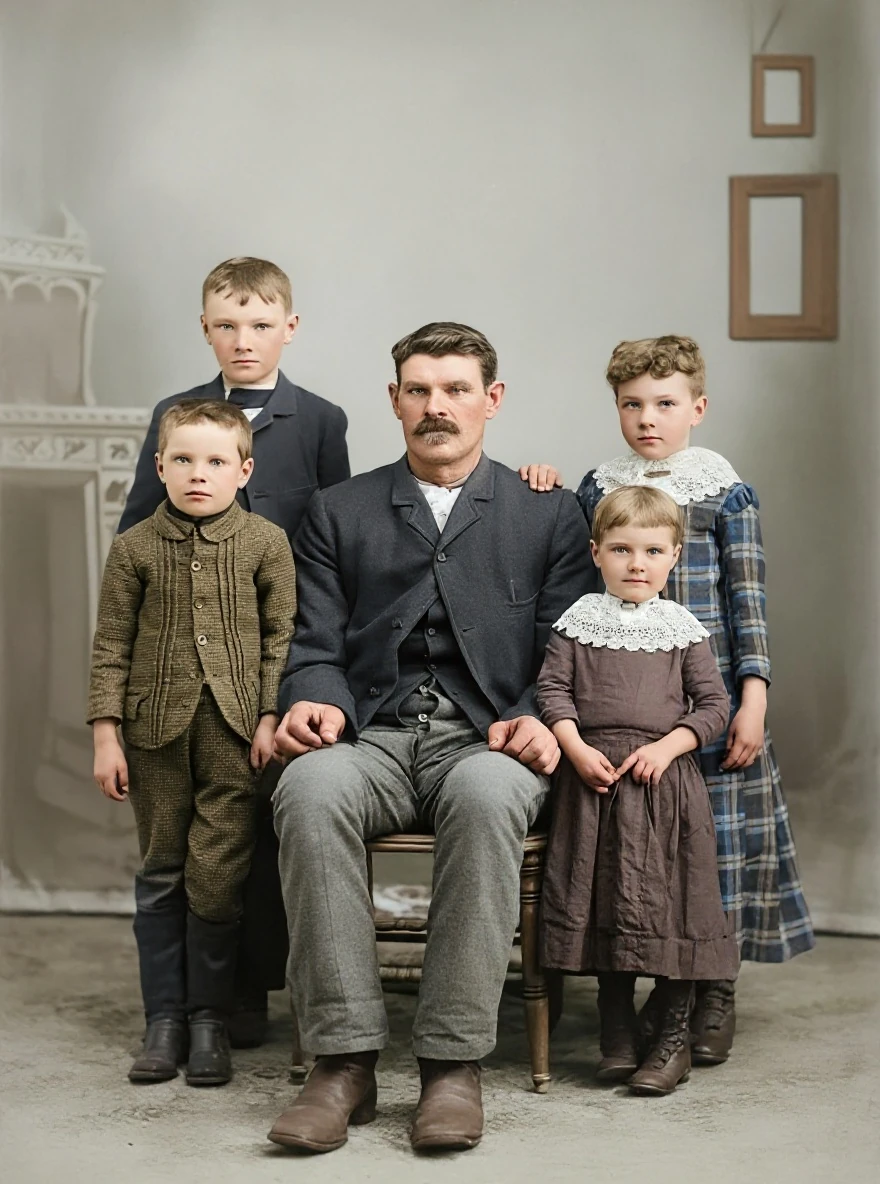
A torn edge in a group portrait · Real customer example
A pale tear runs diagonally through the right side of this group portrait, with a missing white area at the lower edge. The AI result fills these gaps and adds color, while also rebuilding faces, clothing and the studio background. Handwritten marks visible on the original are absent from the result.
What to check: Missing areas, faces, colors and background details are inferred. No identities, relationships, dates or historical accuracy have been established. Keep the original to preserve its handwritten information.
Published with permission. Full framing retained; original and result may have different proportions. Reviewed September 10, 2026.
See the reviewed gallery and more damage types →The full gallery includes six reviewed examples across scratches, creases, tears, fading and color casts. Each has a visible note about what changed.
How it works
- Make a digital copy. Use a flat scan or a well-lit photograph without glare. Save an untouched master. For a fragile or stuck photograph, seek appropriate conservation advice before handling it.
- Upload and preview. The photo upload supports JPG, PNG, WebP, HEIC/HEIF, TIFF, and BMP. TIFF and BMP are converted to JPEG. Follow the file-size and format guidance shown in the upload screen. Processing time varies.
- Compare the details. Look at recognizable facial features, hands, lettering, clothing, edges and background objects. Check the whole frame, not only the part with the largest visible improvement.
- Choose whether to purchase. Review the price and download options. A free preview is not a promise of unlimited free downloads. Keep your original even when you accept the restoration.
Start with your own photograph, or read the scanning guide first.
What does it cost?
The public photo pricing page offers these prepaid credit packs, checked September 16, 2026:
| Pack | Photo credits | Pack price | Approximate price per credit |
|---|---|---|---|
| Small | 3 | US$5.99 | US$2.00 |
| Album | 10 | US$9.99 | US$1.00 |
| Archive | 50 | US$29.99 | US$0.60 |
The unit figures are the pack total divided by its credits, rounded to cents. They are not standalone purchase prices. Check the current purchase page and the final amount before paying. These are photo credit packs; document restoration and other products have different offers.
For a comparison with human services and the questions to ask about scanning, revisions and prints, read the restoration cost guide.
When another approach is a better fit
Choose a workflow with selective editing or a human retoucher when you need to protect a specific inscription, discuss missing detail using reference photographs, or request controlled revisions. AI can infer what is absent; it cannot establish the original appearance of something that is no longer recorded.
For a historically important image, keep the untouched scan as the evidence and label restored or colorized versions as edited. For mould, loose emulsion or a print stuck to glass, digital enhancement is separate from caring for the physical object.
Our AI versus professional restoration guide explains that decision. The comparison collection covers other tools and service models without assigning invented quality scores.
Prepare the result for your project
- Family albums: compare each face and keep names and dates in separate notes. Use the family photo guide.
- Military portraits: do not use generated uniform colors or insignia to identify service or a conflict. See the military restoration guide.
- Memorial displays: confirm the recognizable likeness and final layout with the family. The memorial photo guide includes a print review checklist.
- Enlargements: inspect the actual pixel dimensions and request a small proof before a large print. Sharper-looking texture alone does not establish usable print resolution.
Questions before uploading
Is every image edited by a person? The standard workflow described here uses AI. Do not assume a human retoucher reviews each automated result.
Will colorization recover the original colors? No. Added colors are interpretations unless supported by reliable references. Keep a black-and-white original alongside the colorized version.
Can I send the paper photograph? This page describes an online upload service for digital files, not postal intake or physical conservation.
Where are the usage and privacy terms? Read the privacy policy and terms of service before uploading, especially when the image is sensitive or belongs to someone else.