Photo Restoration Reviews: What to Check Before Buying
A useful photo restoration review lets you inspect the original, the result and the terms of the purchase. A star rating alone cannot tell you whether a service will preserve a particular face, remove your kind of damage or supply a file suitable for your intended print.
This is an ImageRestoreAI buyer's guide, published by the company that sells the service. It is not an independent customer-review feed. We do not assign scores to ourselves or competitors here. The examples below are selected customer results published with permission; they are not a representative sample or a measured success rate.
Inspect evidence that matches your photograph
A clean portrait with mild blur does not demonstrate repair of a torn group photograph. Look for a similar combination of subject, damage and output purpose. Require both frames at a size where you can see what changed.
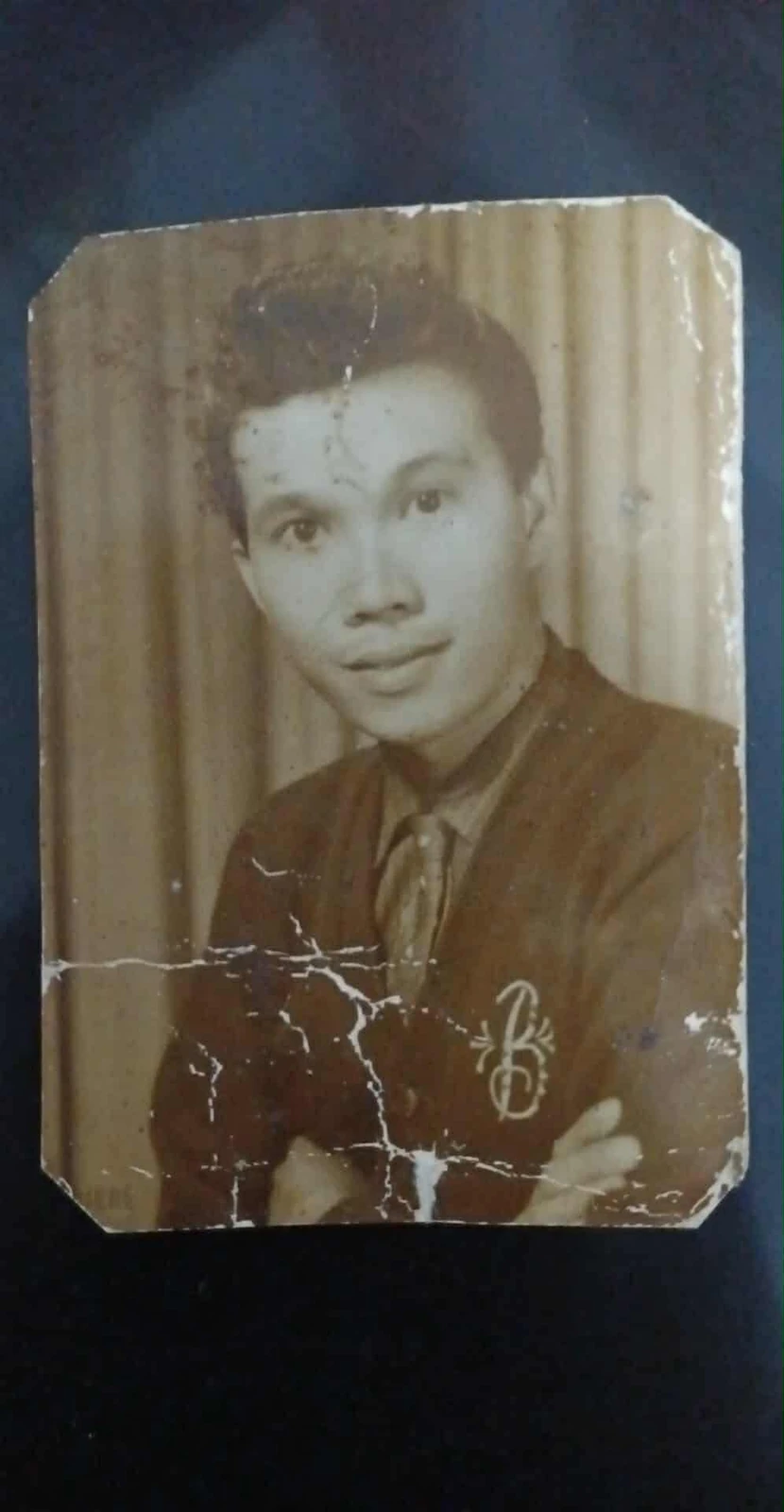
Original scan
AI restoration
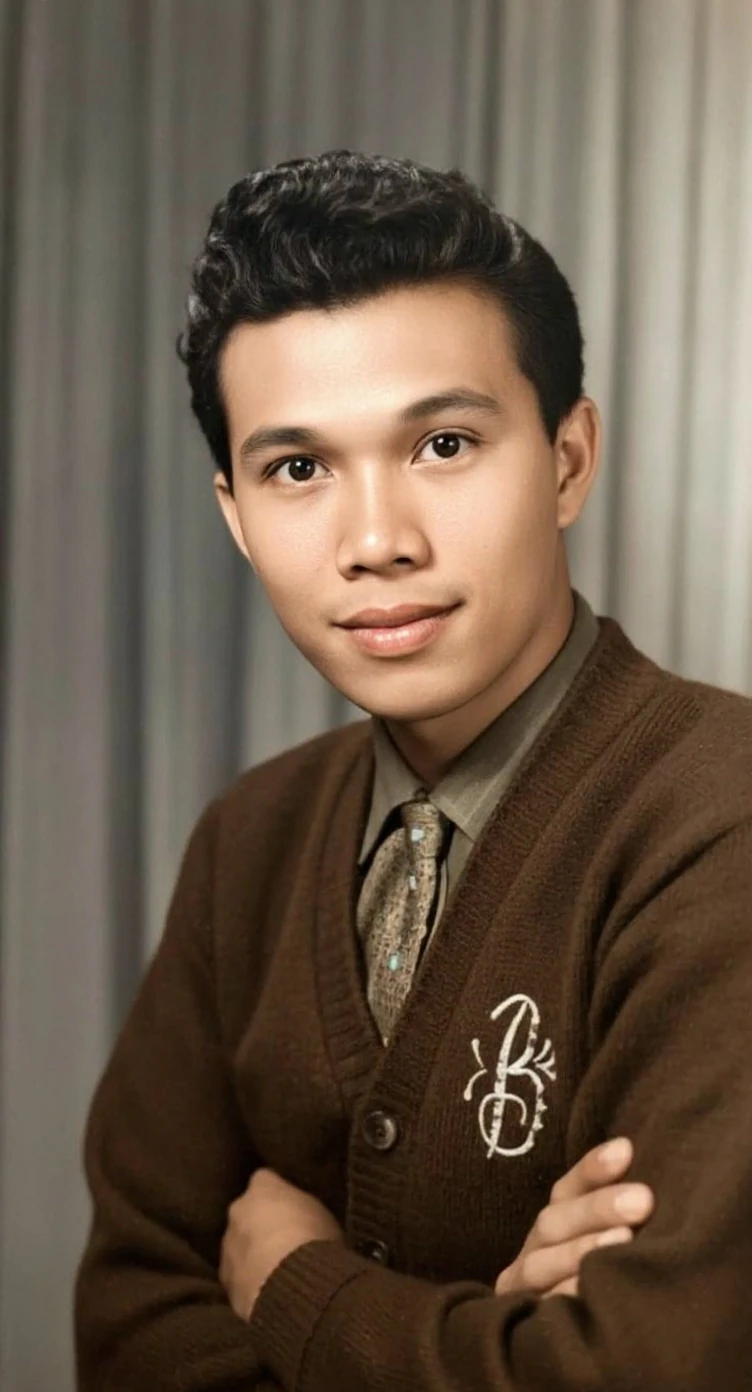
Cracks across a portrait print · Real customer example
Bright branching cracks cross the lower half of this portrait, interrupting the cardigan and folded arms. The AI result replaces those broken areas with continuous fabric and skin detail and adds color. The worn print outline and surrounding dark backing are absent from the result.
What to check: The repaired fabric, hands, colors and fine facial detail are inferred. The output also changes the framing; it does not reproduce the original print border.
Published with permission. Full framing retained; original and result may have different proportions. Reviewed September 10, 2026.
See the reviewed gallery and more damage types →In this case, removing visible cracks is only part of the assessment. Compare the face, hands, cardigan texture and the original backing. A review that only says “sharper” misses the trade-offs.
A practical review checklist
| Question | Evidence to look for | What remains uncertain |
|---|---|---|
| Was the damage actually repaired? | Original and output with comparable framing | Hidden or cropped damage cannot be judged |
| Does the person still look recognizable? | Eyes, mouth, hairline and facial proportions | A generated feature is not proof of the original |
| Is added color appropriate? | A labeled colorized version and any reference image | Plausible color is not verified color |
| Will the file work for my print? | Pixel dimensions, crop and a print proof | A small web preview cannot establish large-print quality |
| What did the reviewer purchase? | Plan, date, download entitlement and service level | An older offer may no longer exist |
| Is the review independent? | Clear publisher relationship and test method | A brand's own comparison has a commercial interest |
The reviewed gallery includes six complete pairs, descriptions of inferred detail and differences in framing. Use those notes to form questions for your own preview, rather than treating one selected result as a guarantee.
How we describe our own results
Our examples show outputs from ImageRestoreAI, with permission confirmed for publication and visual review recorded on September 10, 2026. The captions distinguish visible repair from changes in colors, facial detail and missing regions. We have not used those photographs to run a controlled, same-image comparison of every competitor on this site.
A positive customer reaction can be meaningful, but it does not independently verify facial accuracy, original colors or archival suitability. That is why the image and its limitations matter more here than a synthetic numerical rating.
Compare services without relying on a winner badge
For an automated preview, inspect whether the result meets your needs before purchasing. For a human restoration service, ask what your quote includes, how to supply reference photographs and how revisions are handled. For a desktop editor, consider the time and skill needed to make and review changes yourself.
Start with the comparison collection, then use the service buying guide and cost guide. Each named comparison should identify its source and date; a competitor's advertised feature is different from a measured result on your photo.
Try one difficult photograph first
Choose a photograph whose important details you recognize. Keep the untouched scan, note what must remain unchanged, then compare the preview at the same scale. Check people one by one in group photographs. If an inscription disappears or a face no longer looks right, do not accept the image merely because the scratches are gone.
Preview your photograph or learn how the service works. Review the current purchase and privacy terms before uploading or paying.