ImageRestoreAI vs ChatGPT for Restoring Old Photos
Updated
Compare ChatGPT image editing with ImageRestoreAI restoration previews, including a cautious repair prompt and checks for unintended image changes.
Upload Your Photo To Restore NOW – FREE Preview
Drag & drop or click to select • JPG, PNG, WebP, HEIC
FREE Preview • Review your result before purchasing
ChatGPT can edit an uploaded photograph. It is a useful option when you want to describe and revise an edit in conversation; ImageRestoreAI offers a focused restoration preview followed by a paid-download decision. Neither approach guarantees an unchanged likeness or recovers missing historical information with certainty.
Publisher disclosure: This comparison is written and published by the ImageRestoreAI team, which operates one of the services discussed. It is an editorial comparison of documented features and workflow fit, not an independent review or hands-on comparative test. Official sources were checked on September 16, 2026; recommendations are our editorial judgment.
What current ChatGPT image editing supports
OpenAI's current help page describes ChatGPT Images 2.5 and supports uploading an existing image, describing a change, and making follow-up edits. It also documents selecting an area to edit, while warning that changes can extend outside that selection. This is image editing, not merely advice about editing. OpenAI: Images in ChatGPT, checked September 16, 2026.
The conversation format may suit a repair where the instructions matter: keep the monochrome appearance, leave a border visible, or work on a particular damaged region. Those requests express your intent; they do not guarantee that the output obeys it. Check the output itself, including apparently untouched areas.
ImageRestoreAI offers a free restoration preview in the browser and a paid download. That gives you a direct way to assess a restoration candidate without composing a detailed editing conversation. The tradeoff is that a focused preview should not be mistaken for the same kind of conversational control, or for independently demonstrated superiority.
A starting prompt for cautious repair
If you choose to try ChatGPT, upload a copy of the best available scan and adapt this instruction:
Edit this scan to reduce the visible scratch across the background. Keep the photograph black and white. Preserve the full border, handwriting, facial proportions, clothing and background objects. Do not add decorative detail or a new setting. Leave uncertain missing information understated rather than inventing elaborate features.
This is a suggested starting prompt, not a tested recipe or a preservation guarantee. Narrow the request to the damage you actually see. If the first result changes the face or removes a date, return to the original and revise the request; accepting each new output as the next source can make changes harder to trace.
Three different tasks often called restoration
- Enhancement: making contrast, noise or apparent sharpness more suitable for viewing.
- Upscaling: increasing pixel dimensions, potentially with generated texture.
- Repair: replacing a scratch, tear or missing area with plausible content.
A conversational editor can be asked to attempt these together, but the result should be evaluated separately for each goal. A larger or more detailed image is not automatically a more accurate record.
What inferred detail looks like
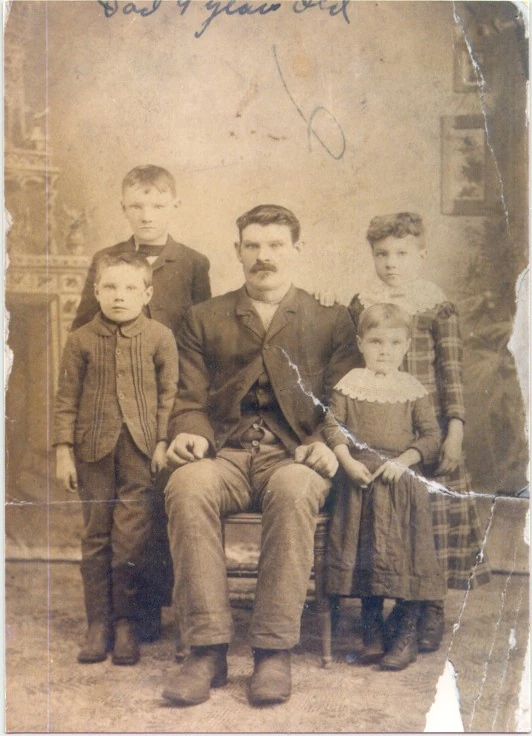
Original scan
AI restoration
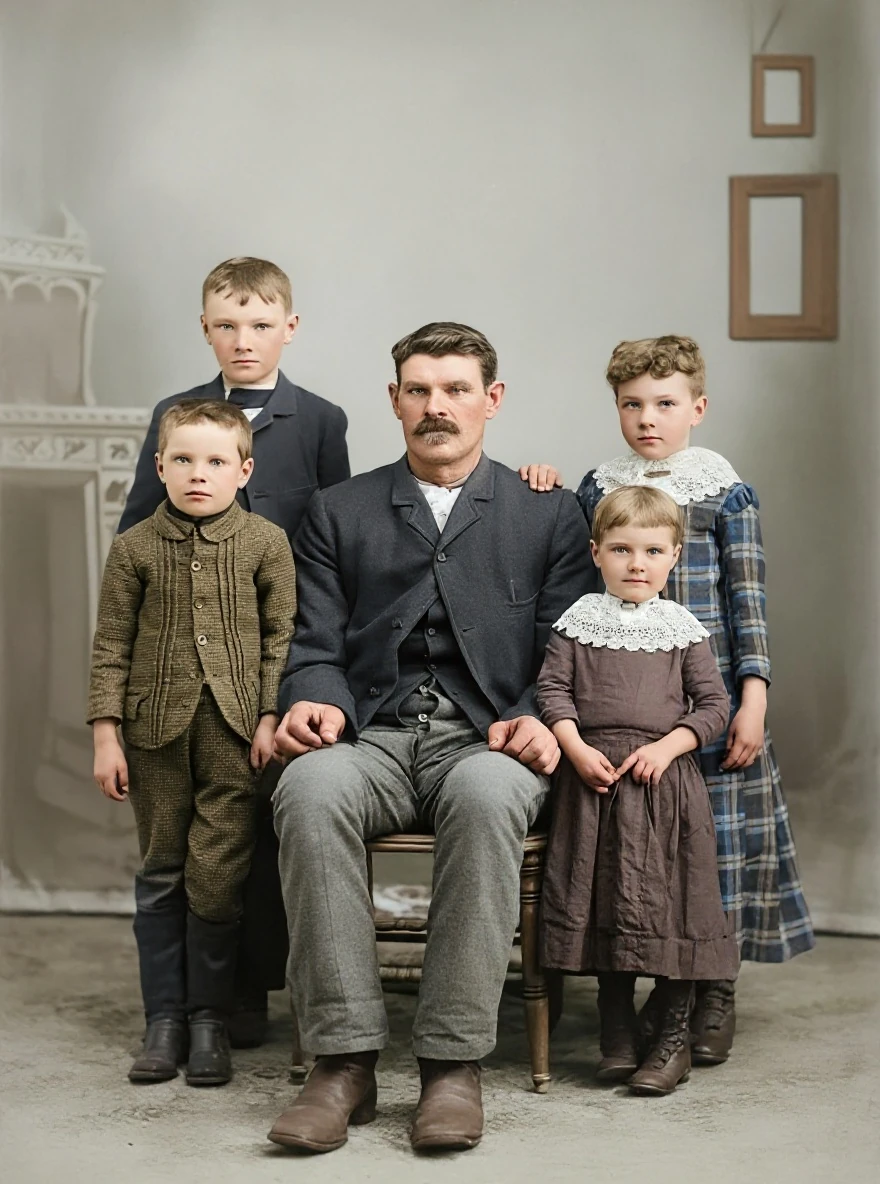
A torn edge in a group portrait · Real customer example
A pale tear runs diagonally through the right side of this group portrait, with a missing white area at the lower edge. The AI result fills these gaps and adds color, while also rebuilding faces, clothing and the studio background. Handwritten marks visible on the original are absent from the result.
What to check: Missing areas, faces, colors and background details are inferred. No identities, relationships, dates or historical accuracy have been established. Keep the original to preserve its handwritten information.
Published with permission. Full framing retained; original and result may have different proportions. Reviewed September 10, 2026.
See the reviewed gallery and more damage types →This selected ImageRestoreAI result fills a tear and a missing edge, while also changing faces and clothing and omitting handwritten marks. It is not a comparative benchmark: no ChatGPT output is shown. The same review questions apply to any tool that reconstructs missing content.
Before you accept either result
Compare the original and output at similar sizes. Check every face, not just the largest one; read any lettering; inspect fingers and repeated patterns; and confirm that the border and aspect ratio still serve your purpose. Retain the original as the record and label an edited version as restored or colorized when sharing it.
If you already use ChatGPT and want iterative direction, its editing workflow may be enough. If you prefer a dedicated restoration starting point, try ImageRestoreAI's preview. If exact local control is essential, consider an editor or a human restorer with a written brief. We have not measured either service's quality, processing time or cost on a shared photo set.
See the Gemini comparison, torn-photo repair guide, and reviewed gallery. Return to compare photo restoration or start a free ImageRestoreAI preview. The download is paid; consult the current purchase offer rather than an old price comparison.
Ready to try it yourself?
Upload your photo for a free preview. Compare faces, colors and detail before purchasing.
Upload Your Photo To Restore NOW – FREE Preview
Drag & drop or click to select • JPG, PNG, WebP, HEIC
FREE Preview • Review your result before purchasing