ImageRestoreAI vs Hotpot AI: Restoration, Cost and Fit
Updated
Compare ImageRestoreAI and Hotpot for old photo restoration: preview access, pricing models, editing limits and a practical result-review checklist.
Upload Your Photo To Restore NOW – FREE Preview
Drag & drop or click to select • JPG, PNG, WebP, HEIC
FREE Preview • Review your result before purchasing
Choose Hotpot if you want to explore a general image-tool service, especially for a small personal restoration project. Consider ImageRestoreAI if your immediate goal is to review a restoration preview and decide whether to buy the download. Neither choice establishes which tool will preserve your particular photograph better: examine the faces, damage and framing before paying.
Publisher disclosure: ImageRestoreAI publishes this comparison and sells restoration downloads. This is an editorial comparison of documented workflows, checked September 16, 2026, not an independently measured head-to-head test. The example below is our own selected result, not a Hotpot comparison.
What are you choosing between?
| Decision | ImageRestoreAI | Hotpot AI |
|---|---|---|
| Starting point | Free restoration preview; downloads are paid | The Picture Restorer advertises free access without an account |
| Workflow fit | Assess an old-photo restoration before purchasing its download | Explore restoration alongside other image tools |
| Spending decision | Check the current download offer before purchasing | Check the selected tool, settings and intended usage |
| Quality decision | Inspect the actual preview for unwanted changes | Inspect the actual result for unwanted changes |
Hotpot describes its Picture Restorer as a tool for scratches, faces and color, supporting both monochrome and color photographs. It also acknowledges that demanding restorations can still need expert work. Those are product descriptions, not findings from a test we performed.
For ImageRestoreAI's current purchase flow and offer details, use the photo restoration comparison hub. A free preview is a chance to inspect a result; it does not mean a free full-resolution download. The visible photo-credit packs, checked September 16, 2026, are 3 credits for US$5.99, 10 for US$9.99 and 50 for US$29.99. These are nonrecurring credit purchases. See current packs and confirm the final amount at checkout; a pack price is not a fixed price per finished photograph.
How to compare the cost of one usable photograph
Hotpot's pricing page says charges depend on the product and settings, with credits needed for commercial usage and advanced settings. Its restoration page identifies the free output license as CC BY-NC. Check that license if your intended use extends beyond a personal project; free access alone does not establish permission for every use.
For either service, define the deliverable first. A family slideshow and a large framed print require different output checks. Record the amount charged now, any renewal, the downloadable dimensions and whether your intended use is covered. If you need to restore, colorize and enlarge a scan, confirm the complete workflow before buying: a headline price for one step is not necessarily the price of the finished file.
For a one-off personal photo, Hotpot is a reasonable starting point if its available result meets your needs. ImageRestoreAI is worth considering when its preview shows a result you want to keep and the paid offer suits you. We have no basis for calling either universally cheaper.
Control means checking what changed
Choosing a restoration tool does not give you control over every reconstructed eyelash, seam or letter. Even a clean-looking result can reinterpret details that survived in the scan. If your priority is to remove one scratch while keeping the rest unchanged, compare an automated result with the possibility of a localized manual edit.
Hotpot documents a scratch flag in its restoration API. That developer option is not evidence of a brush or masking control in the consumer interface, and API access should be assessed separately from the web tool. We have not verified equivalent manual editing controls in ImageRestoreAI.
Original scan
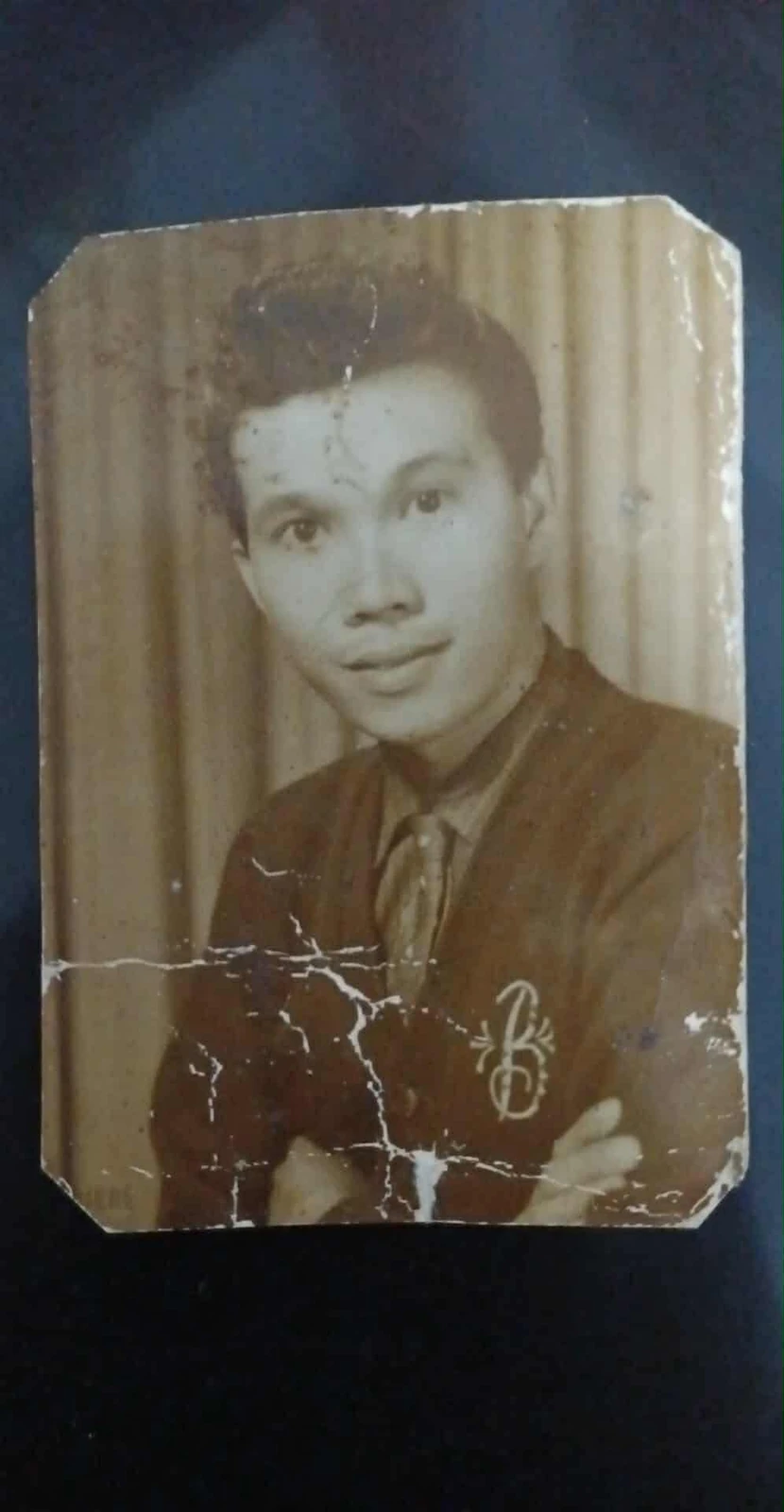
AI restoration

Cracks across a portrait print · Real customer example
Bright branching cracks cross the lower half of this portrait, interrupting the cardigan and folded arms. The AI result replaces those broken areas with continuous fabric and skin detail and adds color. The worn print outline and surrounding dark backing are absent from the result.
What to check: The repaired fabric, hands, colors and fine facial detail are inferred. The output also changes the framing; it does not reproduce the original print border.
Published with permission. Full framing retained; original and result may have different proportions. Reviewed September 10, 2026.
See the reviewed gallery and more damage types →In this selected ImageRestoreAI example, the broken areas become continuous clothing and hand detail, but those details and colors are inferred. The output also changes the framing and omits the worn border. If preserving the print's outline matters, a smoother portrait alone would not satisfy the brief.
Preview checklist for a scratched portrait
- Use one source scan. Keep the original file and submit the same unedited copy to each service you choose to try. Avoid judging an enlarged crop against a small full-frame image.
- Follow the scratch across its full length. Check whether the repair continues naturally through clothing, skin and background rather than repeating texture.
- Compare the likeness. Look at the eyes, mouth, hairline and apparent age. Ask someone familiar with the subject to inspect changes that a stranger might miss.
- Check the frame and color. Note removed borders, cropped hands or unexpected colorization, even when the scratch itself looks better.
- Check the purchase screen. Confirm price, output size and usage conditions. If the preview cannot show a critical detail, treat that detail as unresolved.
The scratch-removal guide explains what to inspect around repaired marks. The family restoration guide helps keep names, captions and original versions together.
When another option belongs on the shortlist
For a sequence of distinct image-processing tasks, read ImageRestoreAI vs VanceAI. For photographs already kept in a family-history account, see ImageRestoreAI vs MyHeritage In Color. If you are still deciding which kind of workflow you need, start with VanceAI alternatives.
Ready to judge your own scan? Try an ImageRestoreAI preview, then decide whether the paid download meets your brief.
Sources checked September 16, 2026: Hotpot's linked restoration, pricing and API pages. Product access, charges and controls can change. No timing, privacy audit, quality score or same-image competitor benchmark was conducted.
Ready to try it yourself?
Upload your photo for a free preview. Compare faces, colors and detail before purchasing.
Upload Your Photo To Restore NOW – FREE Preview
Drag & drop or click to select • JPG, PNG, WebP, HEIC
FREE Preview • Review your result before purchasing