VanceAI Alternatives for Restoration, Color and Manual Repair
Updated
Explore VanceAI alternatives for one photo, family-history colorization, browser restoration and selective manual repair, with pricing-model caveats.
Upload Your Photo To Restore NOW – FREE Preview
Drag & drop or click to select • JPG, PNG, WebP, HEIC
FREE Preview • Review your result before purchasing
The most useful VanceAI alternative depends on why you want to switch. For one damaged family photograph, consider ImageRestoreAI's preview-to-purchase workflow or Hotpot's browser restorer. For colorizing photographs you already organize in a family-history account, consider MyHeritage. For a stubborn local defect or a known color that automation gets wrong, consider a manual editor or a restorer who accepts specific revision instructions.
You may also have no reason to switch: VanceAI remains worth evaluating if its separate tools or Windows workflow are what you need. This page is a shortlist by task. For a decision between just two services, use ImageRestoreAI vs VanceAI.
Publisher disclosure: ImageRestoreAI publishes this guide and is one of the options. Official sources were checked September 16, 2026. These are editorial recommendations, not rankings from an independently measured head-to-head test.
If you only need a result for one photograph
ImageRestoreAI lets you examine a free restoration preview before deciding on a paid download. That makes it an option for a gift portrait or a small personal project where the result matters more than access to a wider editing suite. Consult the comparison hub for the current product offer; the free preview does not include a free full-resolution export. The current photo-credit packs, checked September 16, 2026, are nonrecurring purchases: 3 credits for US$5.99, 10 for US$9.99 or 50 for US$29.99. Confirm the final checkout amount and the credits required for your intended work before purchasing.
The limitation is that a preview may show changes you do not want. Do not buy solely because a crack disappeared: check the likeness, hands, background and crop. We have not verified a manual brush or desktop batch equivalent for this recommendation.
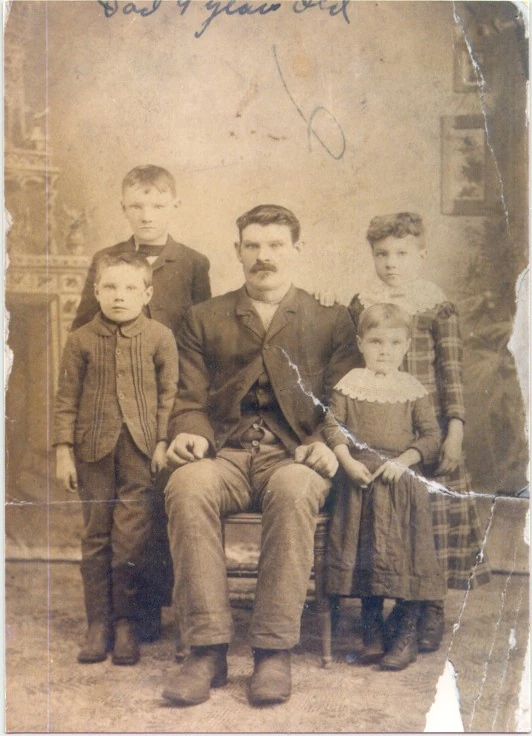
Original scan
AI restoration
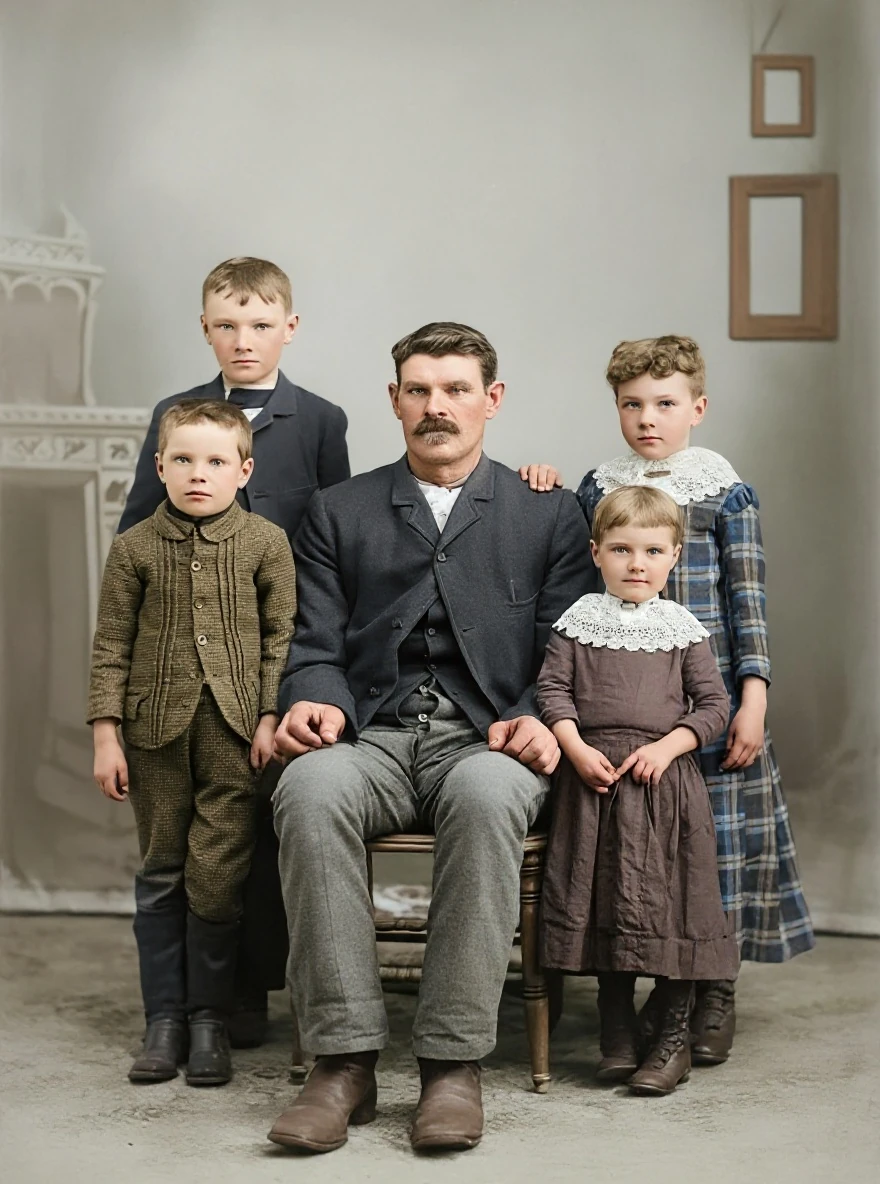
A torn edge in a group portrait · Real customer example
A pale tear runs diagonally through the right side of this group portrait, with a missing white area at the lower edge. The AI result fills these gaps and adds color, while also rebuilding faces, clothing and the studio background. Handwritten marks visible on the original are absent from the result.
What to check: Missing areas, faces, colors and background details are inferred. No identities, relationships, dates or historical accuracy have been established. Keep the original to preserve its handwritten information.
Published with permission. Full framing retained; original and result may have different proportions. Reviewed September 10, 2026.
See the reviewed gallery and more damage types →This selected ImageRestoreAI example shows why a group photo needs more than a glance. Missing areas, faces, colors and background details are inferred, and the original contains handwritten information worth retaining. It is not a same-photo comparison with VanceAI or evidence that every torn photograph can be reconstructed faithfully.
If you want another browser restoration tool
Hotpot is worth trying for a personal photo before committing to a larger workflow. Its Picture Restorer offers free access and identifies restrictions on free-image use. Its pricing page directs users to the chosen product and settings for charges.
The buying question is whether the available output and usage conditions match your project. Do not assume that a free tool means every size, setting or commercial use is free. Our Hotpot comparison covers that decision in more detail.
For damage crossing a face, a different automatic result may help, but it may also invent a different face. Trying a second tool is useful only if you compare both outputs back to the source, rather than picking whichever looks smoothest.
If your real goal is family-history colorization
MyHeritage fits readers who already keep family photographs in its ecosystem and want colorization alongside that context. Its subscription overview distinguishes Photo, Complete and Omni options. Check existing account entitlements before purchasing another service; there is no need to assume every reader requires a new genealogy bundle.
Colorization is not the same job as repairing torn paper in a scan. MyHeritage lists In Color and Photo Repair separately. For the narrower choice, read ImageRestoreAI vs MyHeritage In Color, or use the colorization alternatives guide if color is your primary concern.
If you need selective control
A manual digital editor or a commissioned restorer belongs on the shortlist when you must keep a recognizable feature unchanged or use a known reference color. The relevant control is the ability to isolate a region, review the edit separately and revise it. Automatic sliders are not a substitute for an agreed repair brief.
Ask a service what deliverables, revisions and working files its quote includes. Request a proof before approving the full job. Prices and turnaround vary by provider and scope; we have not priced or tested a manual service here. Human editing also involves interpretation, particularly where part of the image is missing.
When staying with VanceAI makes sense
VanceAI documents separate restoration and colorization tools. If those steps already suit your workflow, first identify the specific problem you want an alternative to solve. More tools do not automatically make a result better, but switching to a narrower service may remove a capability you need.
Its pricing documentation has inconsistent credit descriptions, so verify operation charges rather than treating the advertised credit allowance as a count of finished photos. That uncertainty prevents a reliable cheapest-provider ranking here.
A shortlist checklist that avoids buying the wrong tool
- Name the problem: damage repair, added color, enlargement or a selective correction. Choose two relevant options, not every service on a list.
- Set non-negotiables: full border, readable handwriting, unchanged expression, or a specific output size. Write them down before seeing results.
- Use a representative scan: a group photo tests different details from a studio portrait. Preserve the complete source and album context.
- Inspect each result against the original: check every face, small objects and missing edges at a comparable viewing size.
- Check the whole purchase: download access, total charge, renewal, credit expiry where applicable and intended-use permissions.
- Stop if the brief is not met: a clearer result with the wrong face is a rejected result. Consider a selective manual correction or retain the original.
The family restoration guide explains how to preserve context, while the torn-photograph guide addresses missing-image limitations. When you have a candidate scan, try ImageRestoreAI's free preview and judge it before considering a paid download.
Evidence boundary, September 16, 2026: linked provider pages establish advertised features and pricing models only. We have not verified competitor output quality, processing time, privacy behavior or full-resolution free-export availability.
Ready to try it yourself?
Upload your photo for a free preview. Compare faces, colors and detail before purchasing.
Upload Your Photo To Restore NOW – FREE Preview
Drag & drop or click to select • JPG, PNG, WebP, HEIC
FREE Preview • Review your result before purchasing