ImageRestoreAI vs neural.love: Restoration, Faces and Upscaling
Updated
Compare ImageRestoreAI with neural.love’s advertised restoration and enhancement tools, with clear research limits and a checklist for evaluating your scan.
Upload Your Photo To Restore NOW – FREE Preview
Drag & drop or click to select • JPG, PNG, WebP, HEIC
FREE Preview • Review your result before purchasing
neural.love advertises old-photo restoration, face enhancement and image upscaling as separate tools. ImageRestoreAI offers a focused restoration preview with a paid download. Choose according to the problem in your photograph and the result you can inspect; there is no supported quality ranking between these services here.
Publisher disclosure: This comparison is written and published by the ImageRestoreAI team, which operates one of the services discussed. It is an editorial comparison of documented features and workflow fit, not an independent review or hands-on comparative test. Official sources were checked on September 16, 2026; recommendations are our editorial judgment.
What we could verify about neural.love
The official old-photo page advertises scratch repair and color enhancement. The face-recovery page describes enhancement of blurry faces, while the image-enhancer page describes upscaling and text-directed editing. These descriptions establish the advertised tool categories. Old-photo restoration, face enhancement, and image enhancement, checked September 16, 2026.
Research limit: the accessible public material exposed only brief descriptions for these tools. We could not establish the current signed-in settings, underlying restoration model, credit requirements or export conditions. We therefore do not repeat older claims about its prices, reliability, support or output quality. Limited access to documentation is not evidence that the service performs poorly.
ImageRestoreAI's free-preview, paid-download flow provides a restoration candidate for you to inspect. Its published examples show both reduced visible damage and changed details. That gives readers concrete things to check, but does not prove better performance than neural.love or predict the outcome for another photograph.
Choose the tool category before the provider
For an intact photo that is simply too small for its intended display, investigate enlargement. Upscaling adds pixels; it does not turn the file into a higher-resolution original scan. For a soft face, investigate enhancement, while checking whether generated detail changes the likeness. For a scratch, crease or missing edge, investigate repair of the damaged region.
A photograph can need more than one operation. Avoid assuming that the most dramatic enhancement is the best starting point. If you repeatedly feed an edited version into another tool, it becomes harder to distinguish surviving detail from earlier reconstruction. Keep the original available throughout.
What would count as an acceptable result?
Before trying either service, write down a short acceptance list specific to your scan. For a studio portrait it might be: reduce the background scratch, retain the mustache and glasses shape, preserve the full border, and keep the photograph monochrome. For a group photo, include all faces and any writing at the edges.
Then check the candidate against that list:
- Damage: has the actual mark or gap improved, rather than simply becoming less noticeable after smoothing?
- Identity: do the eyes, mouth and face shape still match the visible source information?
- Context: are clothing, objects, inscriptions and background structures retained?
- Interpretation: have color or new textures been added where the original does not establish them?
- Deliverable: can you obtain the dimensions and file you need under the current export conditions?
This is a suggested personal evaluation, not a report of tests we conducted. A visually pleasing reconstruction can still be unsuitable for a family archive if it removes a date or changes a recognizable feature.
Inspect a real portrait example
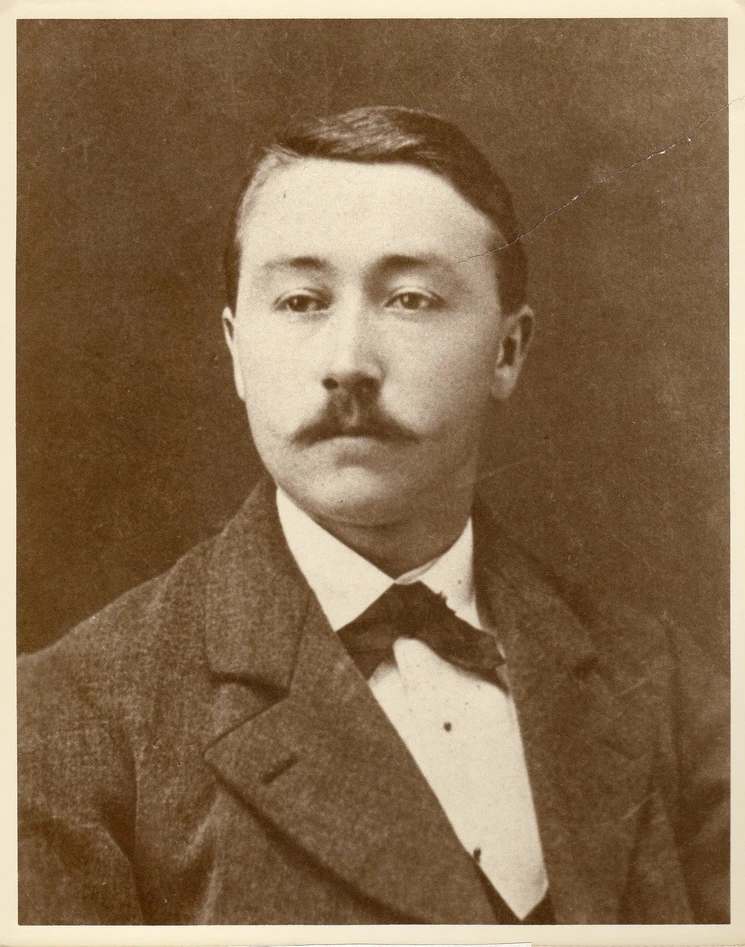
Original scan
AI restoration
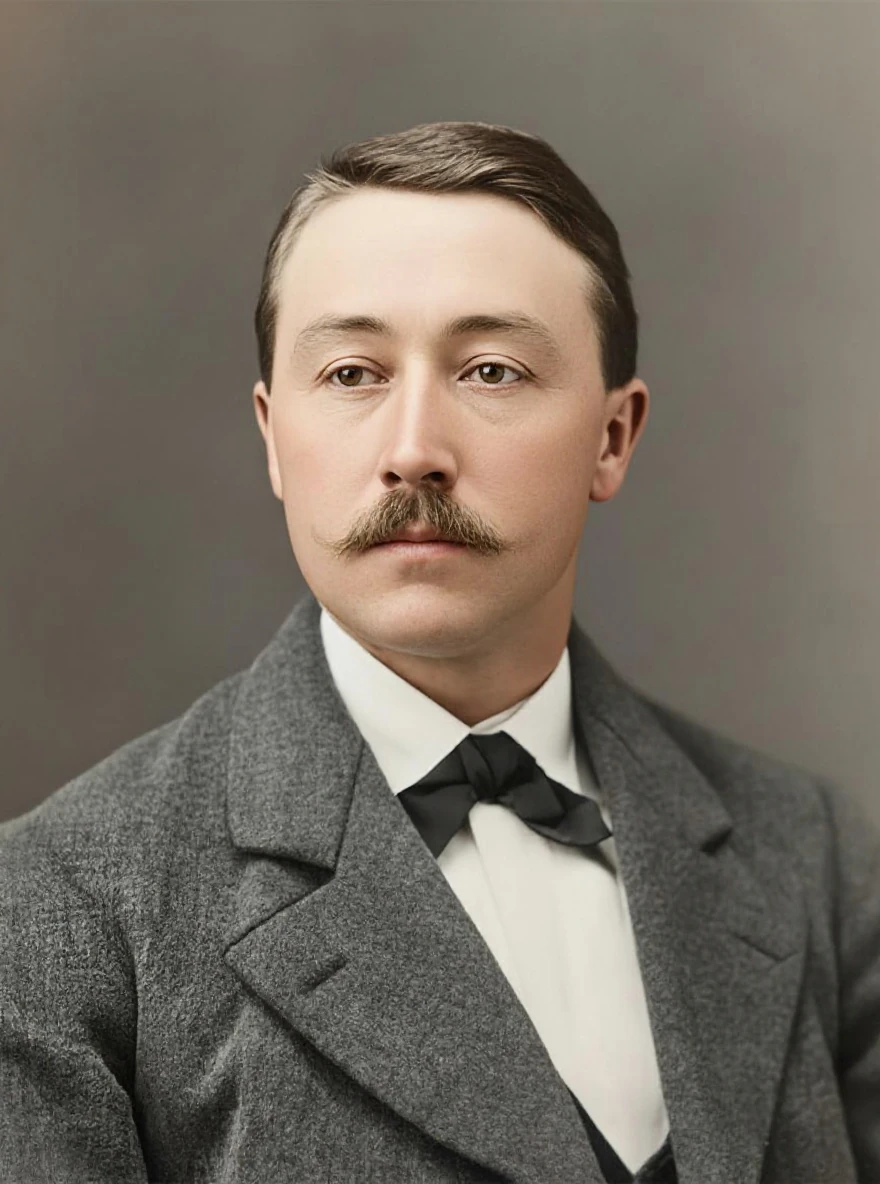
Scratched sepia studio portrait · Real customer example
The original has a sepia cast, fine surface marks and a diagonal scratch across the upper right. The AI result smooths the background and makes the hair and jacket appear more defined, while also introducing skin tones and changing fine facial detail.
What to check: The output adds color and reconstructs fine facial detail. It does not establish the original colors or guarantee an unchanged likeness.
Published with permission. Full framing retained; original and result may have different proportions. Reviewed September 10, 2026.
See the reviewed gallery and more damage types →This selected ImageRestoreAI output reduces surface marks but adds color and changes fine facial detail. It is not a neural.love result or a comparative benchmark. Use the original mustache, face shape and border to see why a clearer portrait still needs a likeness check.
When each option makes sense
Consider neural.love if one of its advertised tool categories matches your task and you can verify the relevant controls and download terms before committing. Consider ImageRestoreAI if you want a dedicated restoration preview to assess before purchasing. If a needed export condition remains unclear, resolve it in the provider's current interface before spending money.
For examples of the tradeoffs, inspect the reviewed restoration gallery. Its selected ImageRestoreAI pairs are not a comparative benchmark and show no neural.love results. The Remini comparison addresses portrait enhancement, while the Topaz comparison covers adjustable desktop tools.
Use the family photo guide to keep originals and edits organized. Return to compare photo restoration, or try an ImageRestoreAI free preview. Downloads are paid; this comparison makes no exact-price or cost-saving claim.
Ready to try it yourself?
Upload your photo for a free preview. Compare faces, colors and detail before purchasing.
Upload Your Photo To Restore NOW – FREE Preview
Drag & drop or click to select • JPG, PNG, WebP, HEIC
FREE Preview • Review your result before purchasing