ImageRestoreAI vs MemoryCherish: Preview or Artist-Led Restoration?
Updated
Compare ImageRestoreAI previews with MemoryCherish artist-led restoration, revision terms and buying considerations without unsupported quality rankings.
Upload Your Photo To Restore NOW – FREE Preview
Drag & drop or click to select • JPG, PNG, WebP, HEIC
FREE Preview • Review your result before purchasing
Choose between ImageRestoreAI and MemoryCherish by how you want to evaluate and direct the work. ImageRestoreAI offers a free AI preview with paid access. MemoryCherish describes a commissioned, human-directed restoration service. A preview may help you judge a display copy yourself; an artist-led order may suit a photograph that needs a detailed brief and discussion of corrections.
Publisher disclosure: ImageRestoreAI owns this page and sells one of the services discussed. We checked MemoryCherish's official pages on September 16, 2026 but did not order or test its service. This is a comparison of documented workflows and purchase questions, not a verdict on which company produces better images.
What MemoryCherish currently documents
MemoryCherish's service page describes artist-led restoration and digital delivery. Its terms, sections 3.2–3.6, describe human-directed work, reasonable revisions within the original order, interpretive reconstruction and limits imposed by the source. Those terms also acknowledge that colorization does not establish exact historical colors. Both sources were checked September 16, 2026.
This supports considering MemoryCherish when you want an editor to work from instructions. It does not prove that any particular missing feature can be recovered. Ask how your specific image and references will be handled before placing an order.
What you can evaluate with ImageRestoreAI
You can upload a digital copy for a free preview, compare the available result with the source, and decide whether to buy access. This guide compares that AI preview workflow; it is not a description of every service or plan either company may offer.
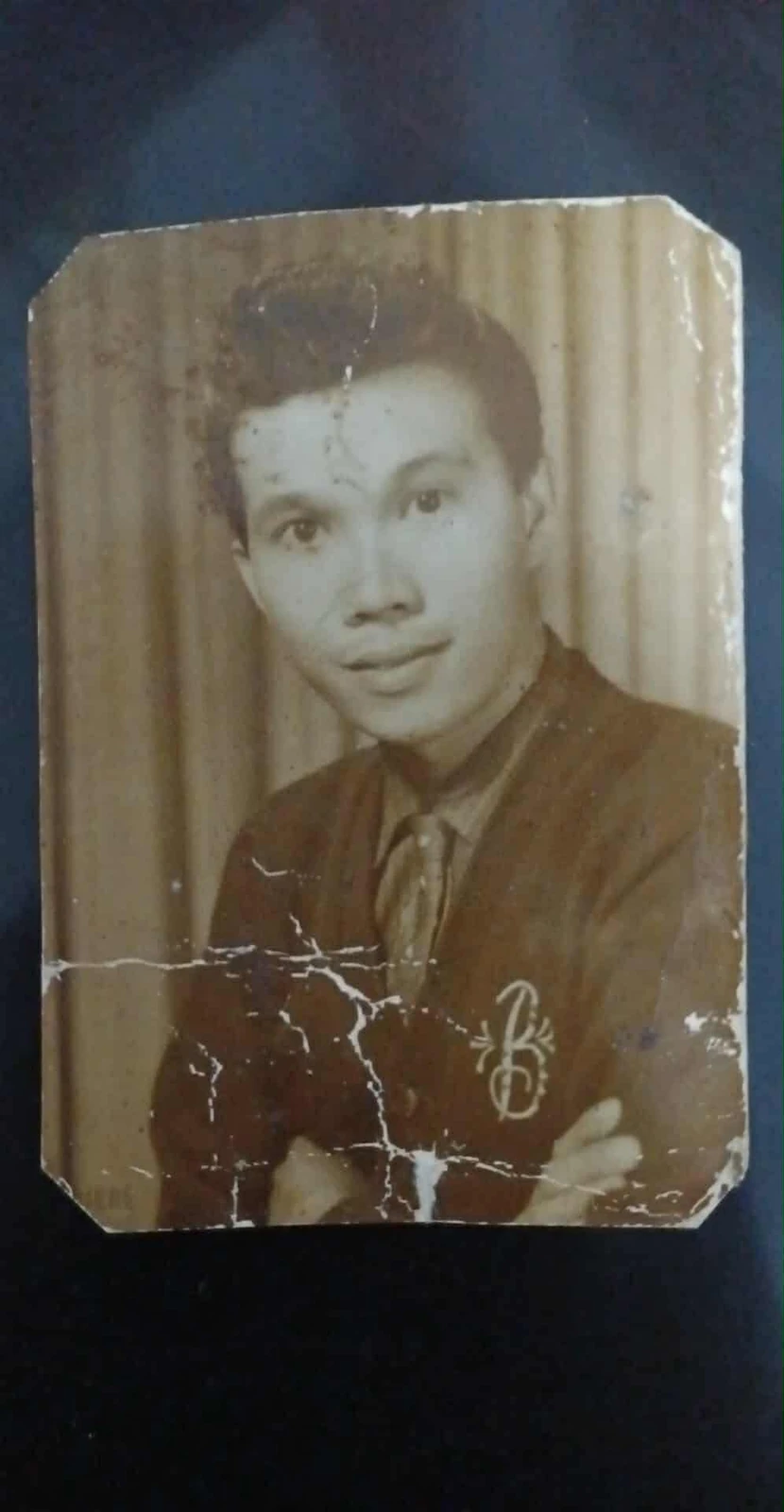
Original scan
AI restoration
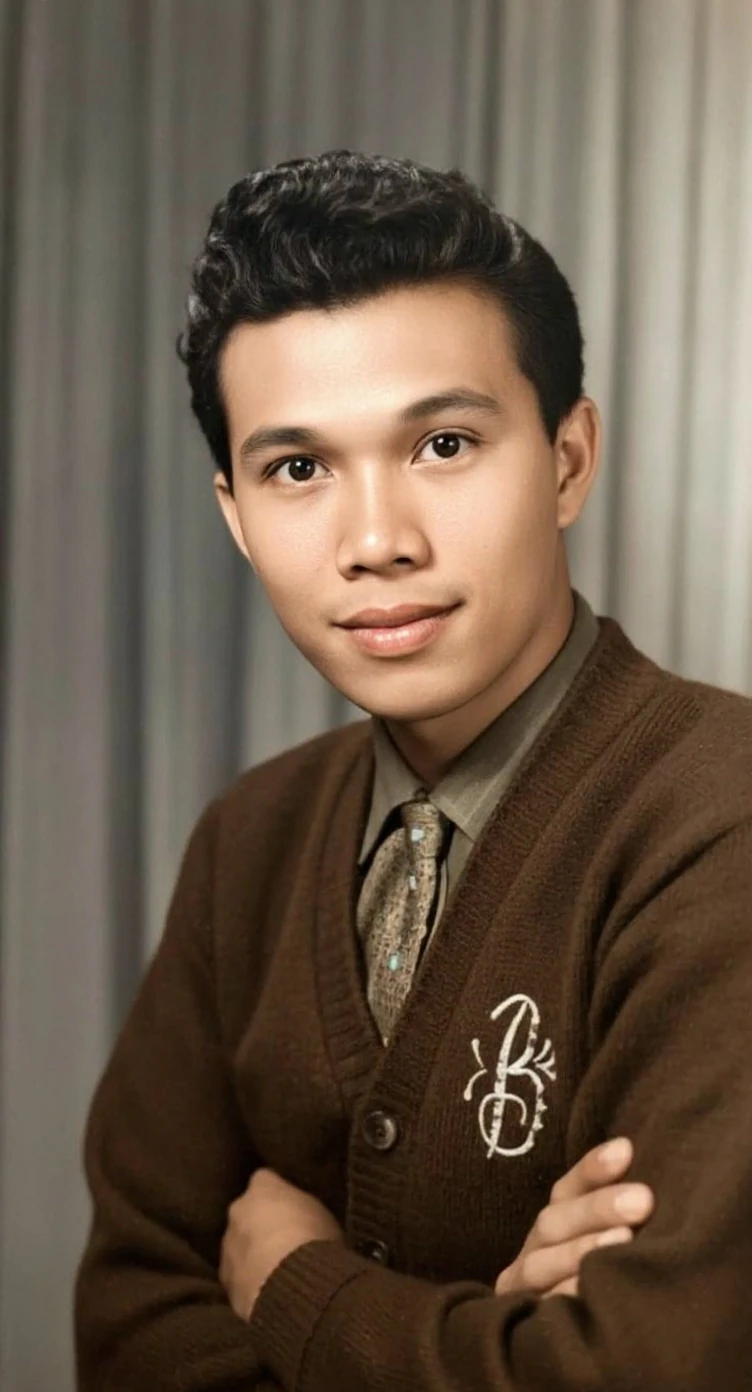
Cracks across a portrait print · Real customer example
Bright branching cracks cross the lower half of this portrait, interrupting the cardigan and folded arms. The AI result replaces those broken areas with continuous fabric and skin detail and adds color. The worn print outline and surrounding dark backing are absent from the result.
What to check: The repaired fabric, hands, colors and fine facial detail are inferred. The output also changes the framing; it does not reproduce the original print border.
Published with permission. Full framing retained; original and result may have different proportions. Reviewed September 10, 2026.
See the reviewed gallery and more damage types →In this selected ImageRestoreAI example, the branching cracks are replaced with continuous-looking fabric and skin. The result also adds color, reconstructs hands and fine facial detail, and changes the framing by removing the print outline and dark backing. Those are meaningful changes to review, not just cosmetic side effects.
This pair was previously reviewed and authorized for publication. It does not show a MemoryCherish result, establish average quality or demonstrate that our approach is preferable. If your brief requires the exact border or an unchanged garment pattern, judge against those requirements even when the repaired image looks appealing.
Choose according to the review you need
An automated preview is a useful first step when you have a clear digital source, can inspect the important details yourself and are willing to decline an unsuitable result. Separate “the damage looks less visible” from “the person still looks right.” Both need an answer.
An artist-led order deserves consideration when you need to provide reference portraits, explain which details matter or request a targeted correction. Confirm that the service will accept the brief and that the correction falls within the agreed scope. Paying for human involvement does not eliminate interpretation or uncertainty.
For a small defect away from a face, you may find a digital result sufficient for sharing. For damage across an eye, a missing hand or an inscription needed for family research, obtain an assessment of what survives before accepting a reconstruction. Our professional restoration guide develops these criteria.
Compare costs without inventing a per-photo bargain
ImageRestoreAI's visible photo-credit packs were verified on September 16, 2026: 3 credits for US$5.99, 10 for US$9.99, and 50 for US$29.99. These specific packs are nonrecurring. Compare the amount you must actually purchase with your needs, rather than treating a larger pack's divided cost as a single-photo offer. Check current pricing; the final purchase amount is shown at checkout.
For MemoryCherish, check the selected service and final order total on its official site. Do not compare an AI credit bundle with a human-service headline price until you know the deliverables, revisions and any optional work included. We make no fixed savings claim.
Before buying either service, confirm whether you need digital files only, a print, scanning help or further editing. A free preview and a commissioned restoration are different purchase stages. Assess what you can inspect before payment and what remedy is available afterward.
Send a brief that can be reviewed
Use these points when requesting a human assessment, and as acceptance criteria when reviewing an AI preview:
- Purpose: a family display copy, an enlargement or a research reference.
- Must retain: face shape, expression, glasses, clothing marks, handwriting and borders that matter to you.
- Allowed changes: contrast adjustment, removal of specific damage, optional colorization or a separately saved crop.
- Uncertain areas: missing features and the reference photographs available to inform them.
- Delivery: desired file, deadline, time for review and any printing requirements.
For revisions, identify the location and the desired correction. “Keep the original mouth shape” is more useful than “make it natural.” Review the applicable terms before ordering; do not assume that a revision includes a different photograph or additional work.
Retain your original scan whichever route you choose. For family groups, our family-photo review guide helps you inspect each person and preserve annotations.
Other routes worth comparing
If you want to make the corrections yourself, read AI restoration versus Photoshop. For software options, use the AI tools shortlist. The broader service guide includes other providers and conservation needs; the comparison hub brings these choices together.
Ready to try it yourself?
Upload your photo for a free preview. Compare faces, colors and detail before purchasing.
Upload Your Photo To Restore NOW – FREE Preview
Drag & drop or click to select • JPG, PNG, WebP, HEIC
FREE Preview • Review your result before purchasing